ProfitNod Get early access

NewFor store owners who already ask AI

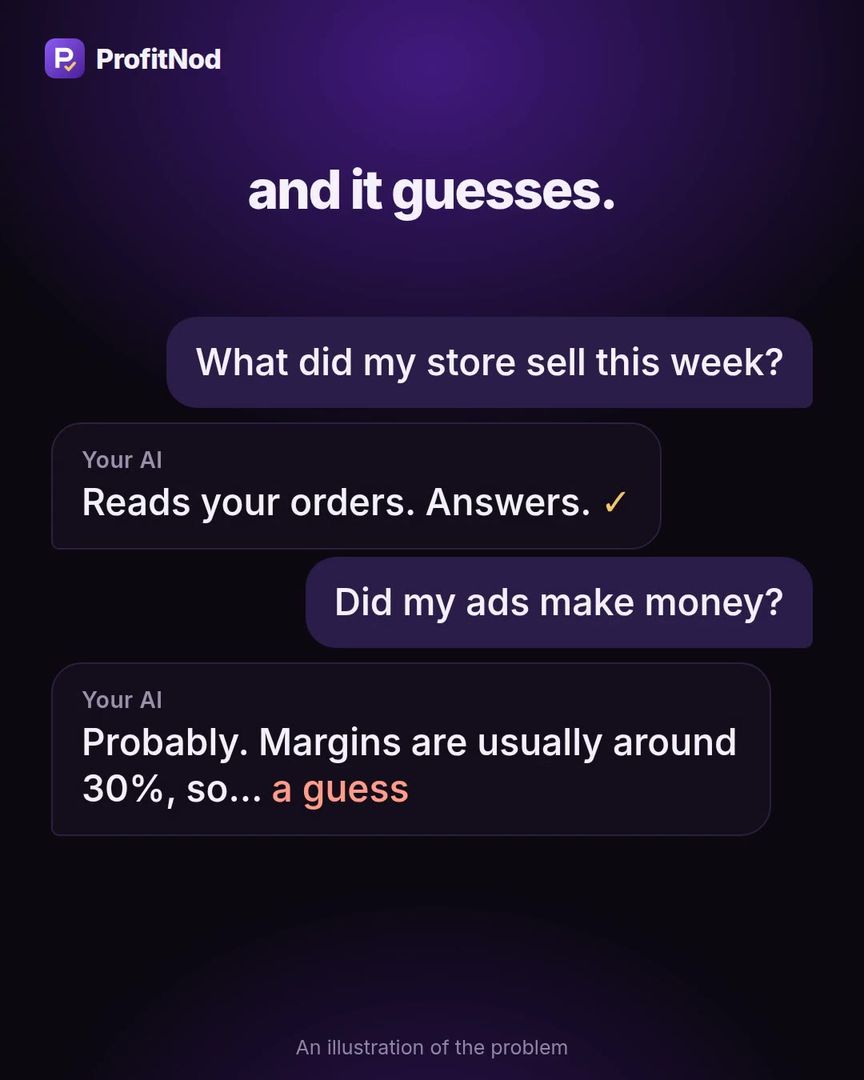
Your AI can read your Shopify orders. On profit, it guesses.

A standard store connection never sees what a product cost you. ProfitNod does the profit math in code, from your real orders and costs, and hands Claude or ChatGPT the answer. If it wants to change a price, it asks you first.

The first 200 stores get the $49 Operator plan free for 60 days. The free plan is free forever. The app is not on the Shopify App Store yet: leave your email and get one message the day your store can install it.

Watch: the same question, with the real numbers

1 min · sound on

  1. 1It does the math in code
  2. 2You paste one link into your AI
  3. 3You ask in plain words

The problem

A profit question’s trip through an AI connector.

  1. You ask“Did my ads make money this week?”
  2. It reads your ordersRevenue, order counts, products. All there.
  3. It looks for what the products costNot in the connector. Neither is shipping, or your ad spend.
  4. It answers anywayWith a number that sounds right. You can’t tell it from a real one.

A confident answer built on a missing cost is still a guess.

In their own words

Store owners describing this exact problem.

“Most MCP tools don’t return that field, which is why it looks wrong even when it’s filled in correctly.”A store owner on the Shopify Community, September 2026, about product cost · source
“I think the biggest thing with AI tools is figuring out whether they’re actually removing work or just giving you another dashboard to check.”A store owner on the Shopify Community, September 2026 · source
“I’ve had campaigns look great in Meta and then look a lot less exciting once you account for the actual costs behind the order.”A store owner on the Shopify Community, August 2026 · source

Public posts. They describe the problem. These people are not ProfitNod users.

The idea

Math by code. Words by your AI.

No model does the arithmetic. Your AI asks ProfitNod. ProfitNod computes profit, your real ROAS and your break-even ROAS from your orders and costs. That break-even number is your line.

The answer in your chat is the same number you see inside Shopify. A missing product cost comes back as an honest range, never a guess.

Try it yourself

Real answers from the demo store. Tap a question.

These are the app’s own answers on our demo store, word for word. It is what your AI gets back.

Did my ads make money this month?

Your AI, with ProfitNod · demo storeYou made $3,324 after ads. ROAS 3.13 vs break-even 1.76 Cost per order $19.45 vs break-even $34.55 Next: Pause or cut this campaign. It lost $449 in this period.

How it works

Three steps once your store installs it.

  1. Open it inside Shopify.It reads your last 60 days of orders, refunds and payment fees. On our test store the first numbers showed in about 1.5 seconds.
  2. Add your costs.Your three biggest sellers, or one rough percentage like 30% to start.
  3. Paste one link into your AI.Claude, ChatGPT or Cursor. Then ask in plain words.

No ad-account login. ProfitNod never touches your Meta, Google or TikTok account: you type one spend number, paste rows, or let your AI send it.

Real screens

What you see when you open it.

Real screens from the app. The numbers are our demo store’s, a made-up shop.

Ask it in plain words.

Connect Claude with one link and it gets the same numbers you see on your screen. ChatGPT and Cursor connect through the same standard. The app shows you what your AI will get before you connect anything.
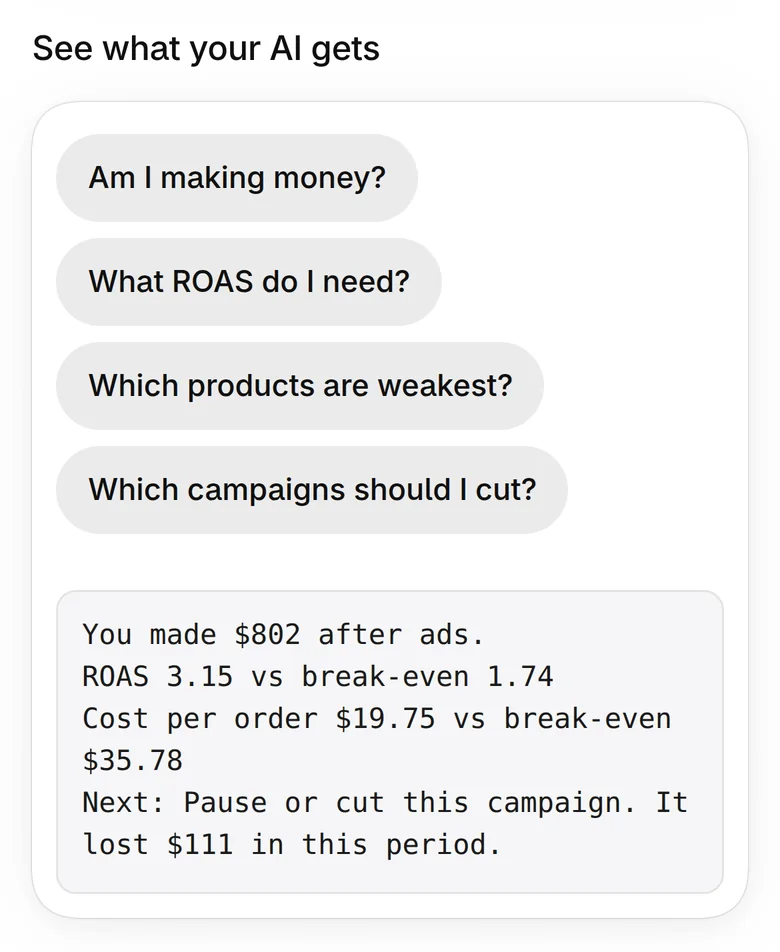
The Connect AI screen showing the answer an AI receives

Read-only unless you choose more.

When you create a connection you pick what it may do: read your numbers, also record spend and costs, or also propose store changes for your approval.
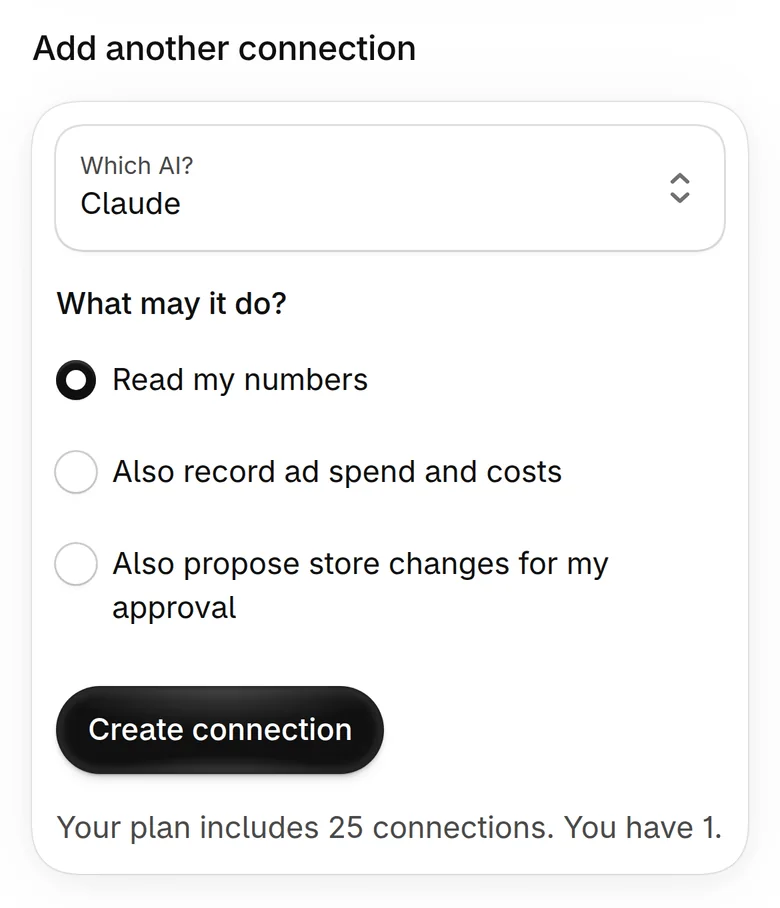
Creating a connection: Read my numbers, Also record ad spend and costs, Also propose store changes for my approval

Nothing changes without your nod.

An AI can propose a price change, with its reason. It waits here until you tap Approve. Every change is in the activity log.
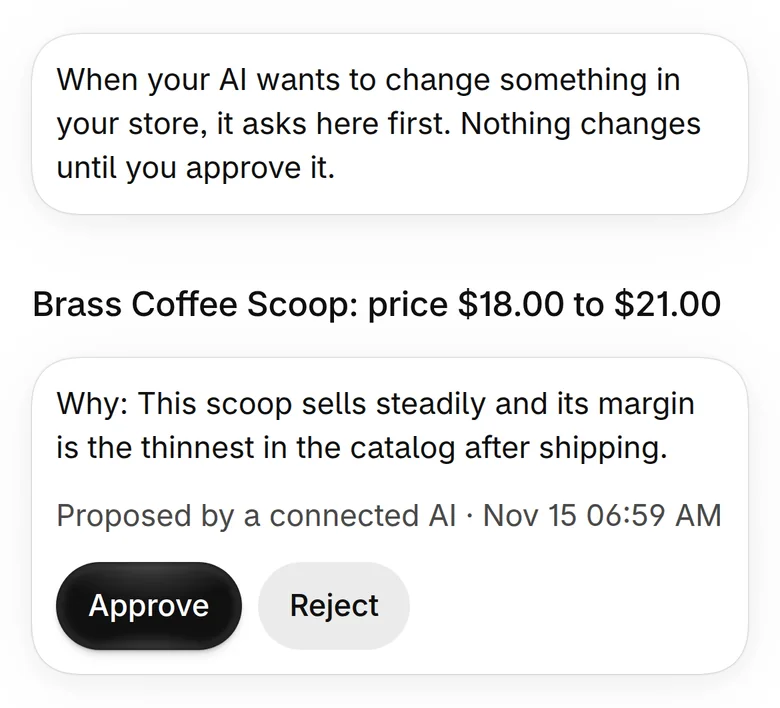
An approval card: Brass Coffee Scoop, price $18.00 to $21.00, with Approve and Reject buttons

Your ROAS, next to your line.

The first screen shows four numbers: profit after ads, your ROAS, your break-even ROAS, and the most an order can cost in ads. Then the one thing to do next.
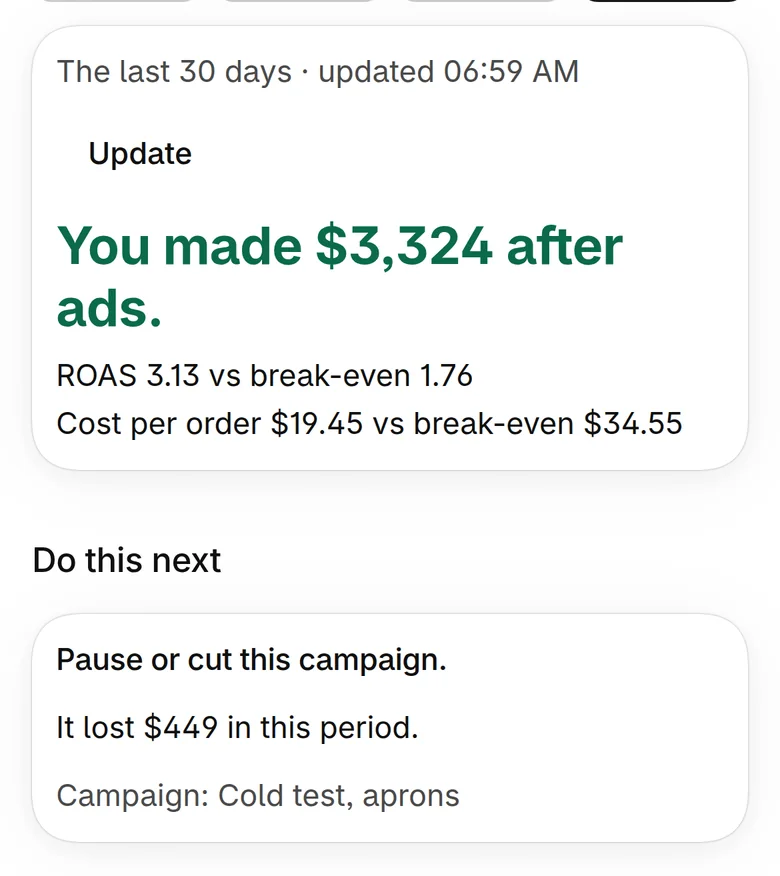
The app's first screen: You made $3,324 after ads. ROAS 3.13 vs break-even 1.76.

A missing cost is a range, never a guess.

Two products had no cost, so the app says “$1,772 to $4,105 after ads” and names them. Type the two costs and the range closes to one number.
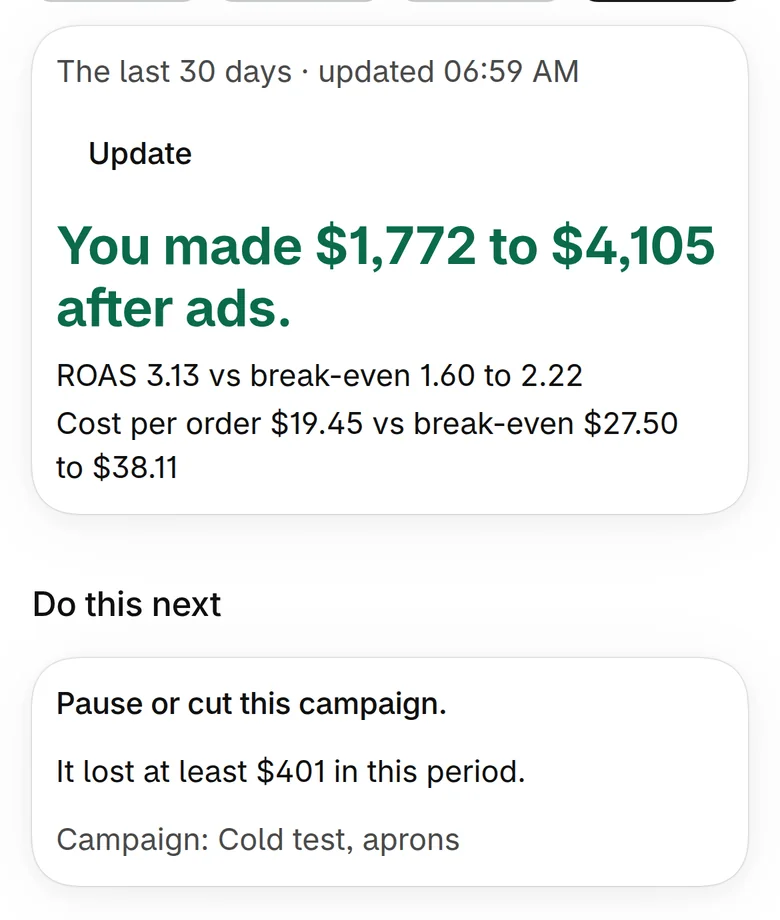
The first screen when two product costs are missing: You made $1,772 to $4,105 after ads.

Safe by design

What your AI never gets.

  • Your AI login. You keep it. Your AI connects to ProfitNod, not the other way round.
  • Automatic store edits. Every new connection is read-only until you allow more, and a change still waits for your tap.
  • Your customers. ProfitNod never reads a customer’s name, email, phone or address, so it has none to pass on.
  • A link that outlives your trust. Remove a connection and its link stops working at once.

No reviews yet. Here is what we checked.

Checked to the cent.

ProfitNod is new, so there are no customer reviews to show you. What we can show is how we tested it.

  • Every figure matched. On our test store, each number the app showed was worked out again by hand from the store’s own order data. They matched to the cent.
  • Fast. The first numbers showed about 1.5 seconds after the app started loading inside the Shopify admin.
  • No guessing. A product without a cost turns the answer into a range, and the app says which cost is missing.
  • Built by people who buy ads. We run a Shopify store ourselves. Finding out at month-end was costing us money.

Same question. Two versions of the answer.

AI with a store connector
AI with ProfitNod
“Did my ads make money?”
Adds up revenue. Assumes a margin. Sounds sure.
$3,324 after ads. ROAS 3.13 vs break-even 1.76.
“Which campaign should I cut?”
Picks the one with the lowest ROAS it can find.
Cold test, aprons: ROAS 0.90, it lost $449.
“What if a cost is missing?”
Fills the gap without telling you.
Says so, and gives a range until you add it.
“Raise that price for me.”
Either can’t, or changes it at once.
Proposes it. Nothing changes until you approve.

Numbers in the right-hand column are the demo store’s.

The honest split

What it does. What you do. What it can’t do yet.

ProfitNod does

  • Reads your orders, refunds, fees and product costs
  • Works out profit after ads and your break-even ROAS
  • Says raise, keep or cut for each campaign you record
  • Finds products with no cost, biggest sellers first
  • Gives your AI the same numbers you see
  • Holds any change an AI proposes until you approve it

You do

  • Fill in product costs once, or one rough percentage
  • Say what an order costs you to ship
  • Add your ad spend: one total, pasted rows, or your AI sends it
  • Decide

Not yet

  • One-click connection to Meta, Google or TikTok ad accounts
  • More than the last 60 days of orders
  • Fixed costs like salaries and rent. Profit is before those.

“But what if…”

“I don’t know every product cost.”

Start with one rough number, like “my products cost me about 30% of the price”. You get a full answer marked About. Then type the cost of your three biggest sellers and it sharpens.

“I advertise on Google and TikTok too.”

Record spend for any channel, as one total or pasted rows. Your line comes from your Shopify orders, not from one ad platform.

“I already have a spreadsheet.”

Keep it, and compare the two once. On our test store every figure matched a hand calculation to the cent. If yours disagree, one of them is missing a cost.

“Is my store’s data safe?”

ProfitNod never reads a customer’s name, email, phone or address, and never touches your ad account. In your store it only reads, until you approve a change yourself. Uninstall and access ends at once.

“Does it work with ChatGPT?”

It is tested with Claude. It uses MCP, the open standard that ChatGPT and Cursor also connect through, and it has a plain web API. Shopify’s own Sidekick can answer from ProfitNod’s numbers too.

The price

Start free. Pay when your AI does the work.

Free

$0

Forever. No card.

  • Profit after ads and your break-even ROAS
  • Raise, keep or cut for each campaign
  • Missing costs shown as honest ranges
  • 1 AI connection that reads your numbers

Growth

$19 a month

14-day free trial.

  • Everything in Free
  • 3 AI connections
  • Your AI records ad spend and product costs for you

Operator

$49 a month

14-day free trial.

  • Everything in Growth
  • 25 AI connections
  • Your AI proposes price and cost changes. You approve.

The first 200 stores get Operator free for 60 days.

That is the $49 plan, with nothing to pay. When the 60 days end you stay on Free or pick a plan. Nothing bills without your choice, and paid plans go through your Shopify bill.

The first 200 stores get the $49 Operator plan free for 60 days. The free plan is free forever. The app is not on the Shopify App Store yet: leave your email and get one message the day your store can install it.

No leap of faith

Check it against your real orders. Then decide.

Your first ten minutes, once your store can install it:

  1. Open it and read the first number.
  2. Type the cost of your three biggest sellers.
  3. Add last week’s ad spend. One total.
  4. Look at your line.

Not for you? Uninstall in two taps. Access ends at once and your store’s numbers are deleted.

Questions people ask first.

When can I install it?

Not yet: the app is not on the Shopify App Store yet. Leave your email and you get one message the day your store can install it. No newsletter.

Where does ad spend come from?

You type one total, paste rows per campaign, or your AI sends it. There is no one-click sync with Meta, Google or TikTok yet.

How far back does it read?

The last 60 days of orders, refunds and payment fees. It works in the Shopify admin and in the Shopify mobile app.

What is left out of profit?

Fixed costs like salaries and rent. Profit here is after products, shipping, payment fees and ad spend.

Do I need a developer?

No. You install it like any Shopify app, paste one link into your AI, and everything is on the screen.

What happens to my data?

ProfitNod reads order totals, line items, product costs and payment fees. It is not sold, not used for advertising and not used to train AI. Uninstall and it is deleted.

You’ll ask your AI again tomorrow. A guess, or the real number?

Path oneClose this page. Tomorrow your AI answers the profit question the same way: fluently, from order totals.
Path twoGive it the real numbers. Profit computed in code from your own orders and costs, and a tap from you before anything changes.

The first 200 stores get the $49 Operator plan free for 60 days. The free plan is free forever. The app is not on the Shopify App Store yet: leave your email and get one message the day your store can install it.

P.S. You keep your AI login. A new connection can only read, and removing it kills the link at once.

Free plan foreverFirst 200 stores: Operator free for 60 days

Get early access